Get your content AMPLIFIED by the right creators.

Learn how to launch a Social Boost campaign, provide a clear brief and follow creator activity — all from your FameIdols dashboard.

Two ways to promote

Choose how creators engage

Use Social Boost to share employer-supplied content or invite genuine reviews of existing social posts. Choose the campaign type that fits your goal.


'Publish UGC' Tasks

Creators publish tailored promotional user generated content on their own social profiles, using your approved media, talking points and campaign hashtags to create a buzz around your Product, Music or Movie

Good for Distribution & awareness

'Watch & Review' Tasks

Creators visit your original post or video on your social media profile, watch the content in full, and write an authentic, relevant review of 10–100 words, reflecting their genuine opinions.

Good for Authentic feedback

Paid or incentivised activity must follow each social platform’s policies, including disclosure rules. Reviews must never be required to be positive.

Visual walkthrough

How to Launch Social Boost

These examples use screenshots from the current FameIdols employer dashboard. Labels shown as “Social Buzz” reflect the existing interface.

 
Number 1 iconWhite number one inside a purple circle.1

Open your Social Boost dashboard

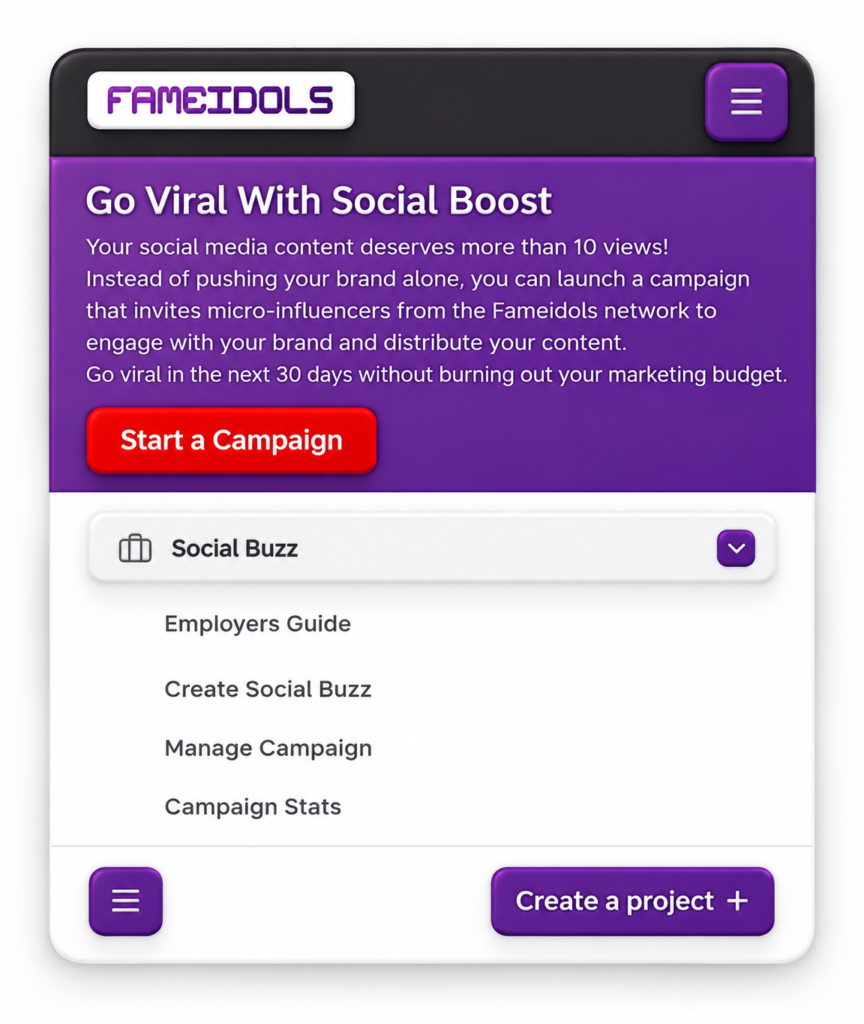
Sign in to FameIdols and open the Social Buzz menu. Select Create Social Buzz, or use the Start a Campaign button on the information page.

IMPORTANT: Your employer account must have an eligible premium pass before you can submit a new campaign on Social Boost

Number 2 iconWhite number two inside a purple circle.2

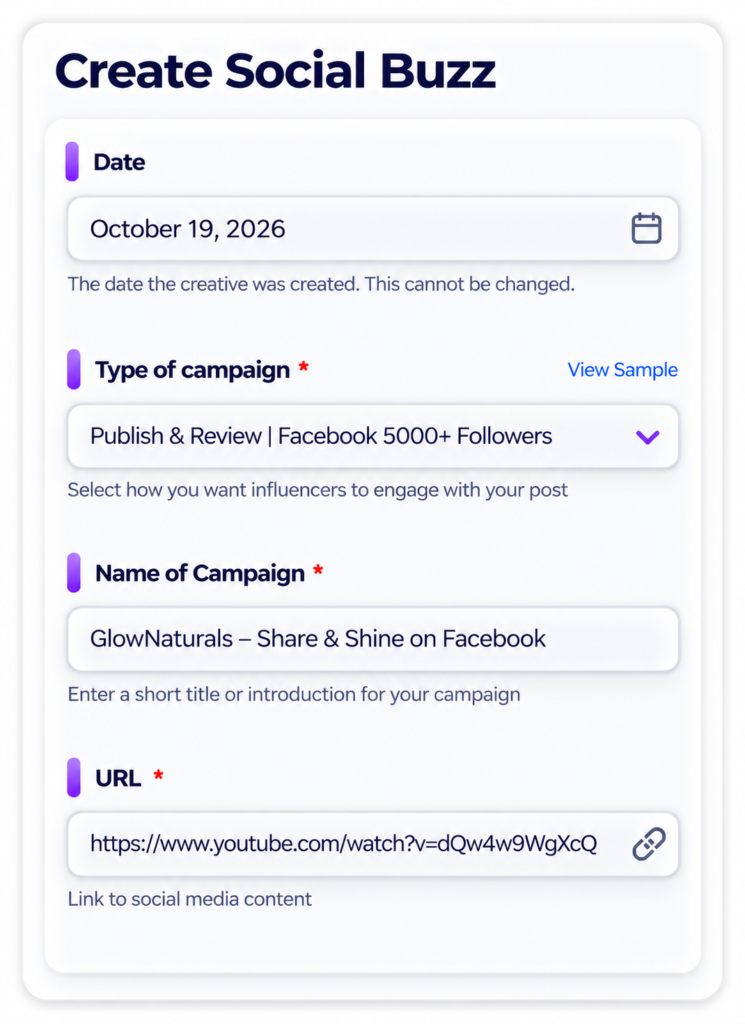
Enter your campaign details

On the creation form, review the date and complete the required fields:

Type of campaign: select the available activity that matches your promotion.

Name of campaign: write a short, recognisable title.

URL: paste the link to the relevant social media content where micro-influencers can watch and review your brand or content.

TIP: Check the View Sample link when available to see the type of message you can use the campaign type for.

Number 3 iconWhite number three inside a purple circle.3

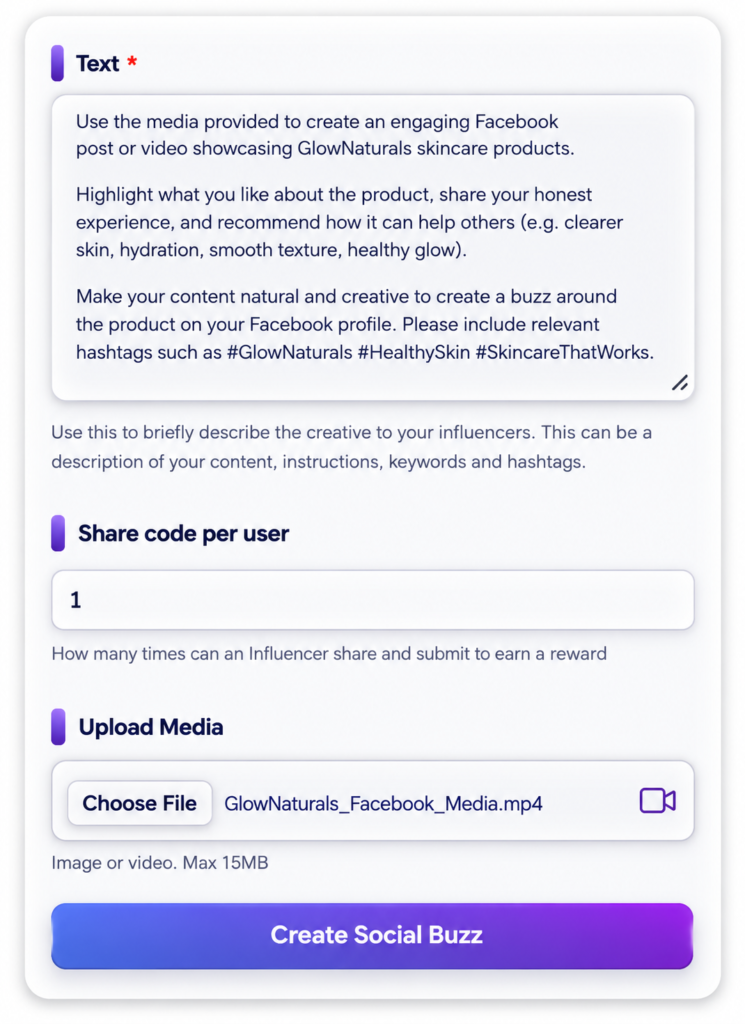
Write the brief and add media

Use the Text field to explain the campaign goal and approved messages, the content being promoted, intended audience, key points, relevant hashtags, deliverable requirements and any restrictions. Avoid requiring a particular opinion or rating.

Share code per user: This setting tells the system how many times a creator can earn from a single campaign.

Finally, optionally upload an image or video (not more than 15MB). This is the media creators will publish on their social media profile

When everything is ready, select Create Social Buzz.

TIP: For reviews, request a genuine 10–100 word response after watching. For promotional posts, provide approved content and disclosure instructions.

Number 4 iconWhite number four inside a purple circle.4

Manage your campaigns

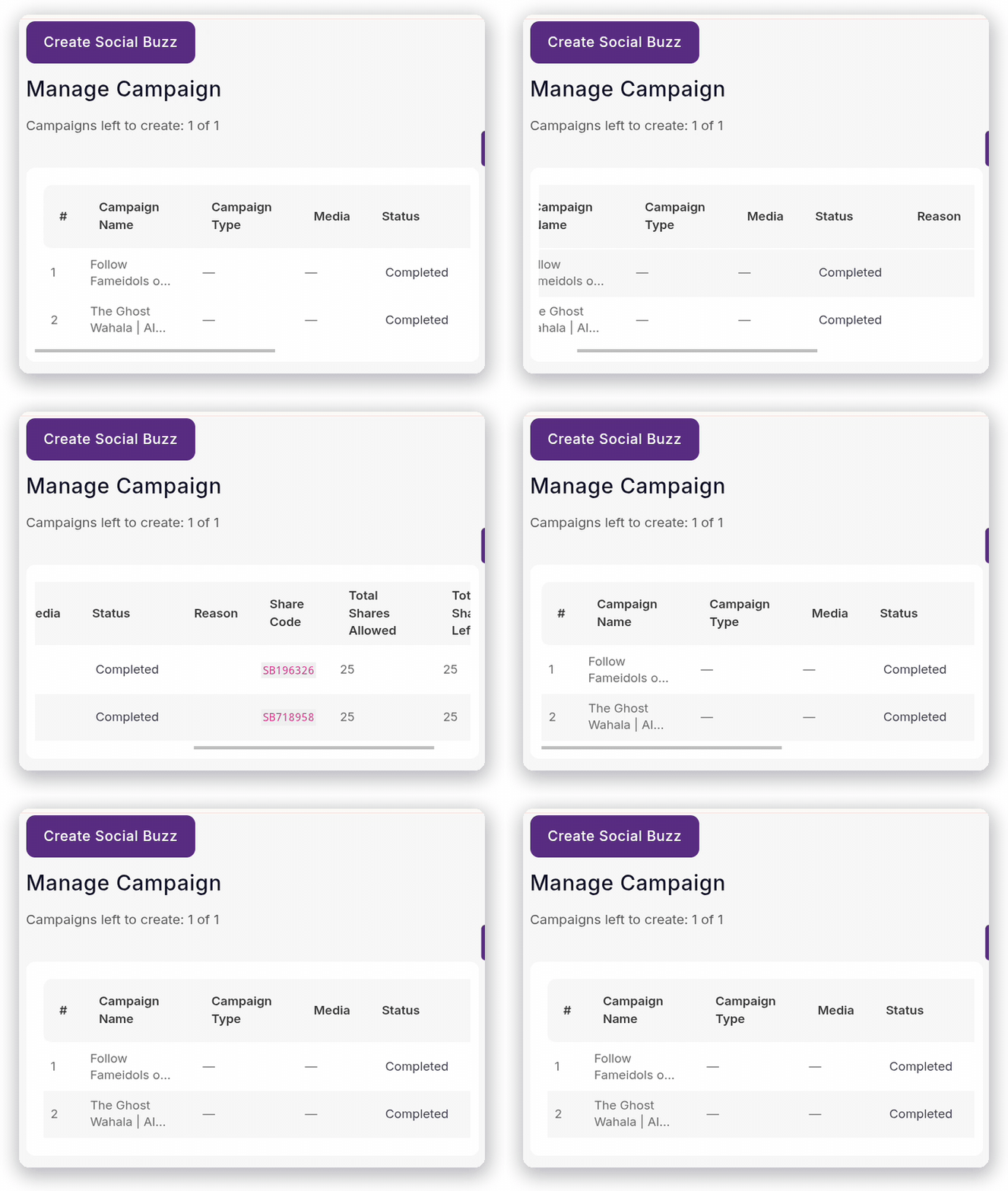
Open Manage Campaign to see your submitted campaigns and their current status. The table includes campaign name, type, media, status and allocation information.

Review whether the campaign has been approved or completed before interpreting the results.

TIP: Keep each campaign title specific so multiple promotions are easy to distinguish.

Number 5 iconWhite number five inside a purple circle.5

Monitor campaign statistics

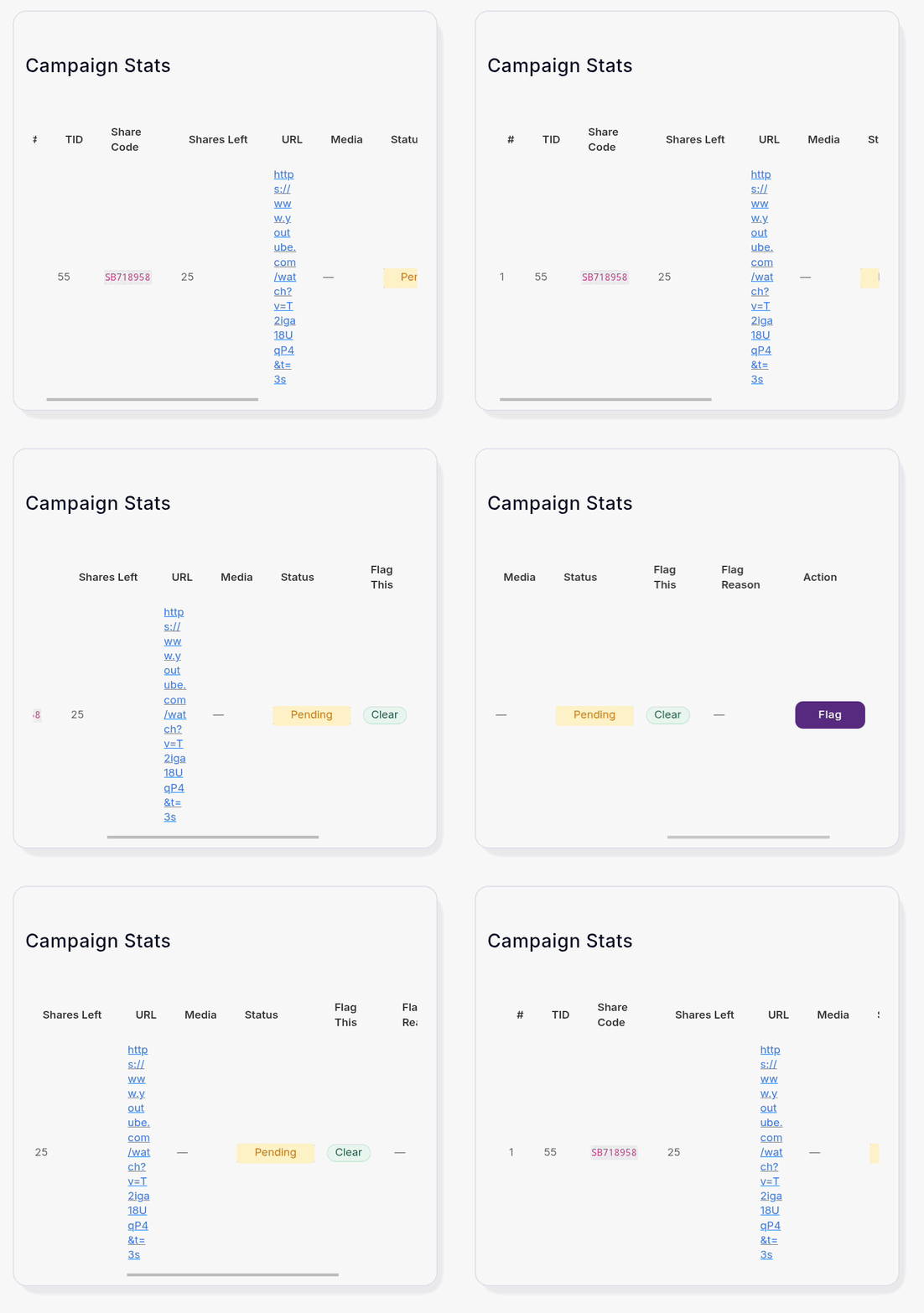
Visit Campaign Stats to inspect the campaign's share code, shares remaining, linked content and status.

Click on URL to view where your campaign was published by micro-influencers

Use the figures to track allocated or remaining activities; they do not by themselves prove views, sales or conversions.

You can also Flag a post or review that did not follow your specification.

TIP: Keep each campaign title specific so multiple promotions are easy to distinguish.

Pricing Features comparison

How much does a Social Boost activation cost ?

This is the FameIdols pricing model for creative activation, subject to the plan you purchase and the final campaign terms. 

Each package gives you access to Collab Drops and Social boost  features as allocated in the table below.

 
FeaturesBasicBronzeSilverGoldDiamondPlatinum
SOCIALBOOSTFEATURES
Social Boost Creatives15 or less20 or less26 or less150 or less300 or less150 or less
Publish UGC Audience Size1000+2500+5000+10001000+2500+
No of Campaigns112333
Shares/ Engagements per Campaign1520135010050
Watch & Review Campaign TypeYesNoNoyesYesNo
COLLABDROPSFEATURES
No of Collab Drops Projects246101520
Featured Collab Drops Projects046101520
Collab Drops Project Duration30 Days30 Days30 Days90 Days90 Days90 Days
Price126 USD360 USD1000 USD1260 USD2520 USD2700 USD
ANSWERS FOR EMPLOYERS

FREQUENTLY ASKED QUESTIONS

Quick answers to common questions about setting up and tracking Social Boost campaigns.

Social Boost FAQs FAQ's

  • What does “Publish UGC Audience Size” mean?

    The audience threshold is the minimum number of social media followers a micro-influencer must have to qualify for your Social Boost campaign.

    For example:

    • 1,000+ followers: Only creators with at least 1,000 followers can participate.
    • 2,500+ followers: Only creators with at least 2,500 followers can participate.
    • 5,000+ followers: Only creators with at least 5,000 followers can participate.

    A creator with 3,000 followers would qualify for campaigns requiring 1,000+ or 2,500+ followers, but not 5,000+.

    The higher the audience threshold, the larger the minimum follower base of eligible creators. However, a higher follower count does not necessarily guarantee more views or engagement.

  • The “Share Code Per User” setting determines how many times each micro-influencer can participate and earn rewards from your campaign.

    For example, if the Basic package allows 15 rewarded activities:

    • Set to 1: Up to 15 different micro-influencers can participate, with each creator earning once.
    • Set to 2: Each micro-influencer can earn up to twice. If every creator participates twice, your campaign will accommodate 8 micro-influencers (7 participating twice and 1 participating once).

    Each rewarded activity counts towards your package allowance, whether the creator shares your content on their social media profile or completes a Watch & Review task.

    In summary: Setting a higher number allows creators to participate multiple times, but it may reduce the number of unique micro-influencers involved in your campaign.

  • Campaign briefs for social boost can be tailored to music releases, movie teasers, product launches, events and other eligible promotional content described in Collab Drops Projects.

  • It represents the remaining share allocation shown in the FameIdols campaign dashboard. It tells how many more micro-influencers can participate in your campaign. It is not the same as total audience reach or verified views. You must follow the URL provided by the creator on the campaign stats page

  • Yes, this type of gig will use the Publish UGC campaign type. Provide approved assets, usage permissions, campaign instructions and any required sponsored-content disclosure

  • Choose a package based on:

    • The number of campaigns you intend to run
    • The number of Collab Drops projects you require
    • Whether you want featured visibility
    • The number of Social Boost creatives needed
    • The scale and frequency of your promotions

    Example

    A musician planning two Collab Drops campaigns and a Social Boost push involving up to 10 creatives may consider the Basic Plan.

    You could use:

    Project 1 for dance content creators to create a dance challenge.

    Project 2 for Acting content creators to create a short drama skit using the same song on the background.

    One song. Different creatives. Different ideas. More opportunities for exposure.

    A brand running several monthly campaigns may need a higher plan with more projects and Social Boost creatives.

  • Use Collab Drops when you need:

    • Original videos
    • Dance challenges
    • Skits
    • Product-placement content
    • Reactions
    • Filming or editing
    • Professional creative services
    • Creators who can combine talent with audience influence

    Use Social Boost when you need:

    • Engagement around published content
    • Relevant reviews or comments
    • More people discovering and watching your content
    • A structured promotional push

    Combine both when you need:

    1. Creatives to produce original campaign content to promote an existing product or content, and
    2. Additional creatives to help increase awareness of published content.
  • Influencers are obliged to submit a proof of the campaigns they have chosen to execute. This proof must include a link to the content where they have shared, reviewed, liked, e.t.c, with/without an image tat shows the engagement done. You can view all proofs submitted to your campaign on Campaign Stats page

  • Fameidols cannot guarantee monetisation on third-party platforms.

    However, engagement campaigns help generate the signals platforms often use to increase visibility and monetisation opportunities.

  • Yes.

    Employers can run multiple campaigns depending on their premium pass level.

Ready to promote your content?

Prepare your campaign link, creative assets and instructions, then head to your FameIdols dashboard.