Four practical Lessons for Creators & Micro-Influencers on FameIdols

Learn how to build a standout profile, create a gig, apply for Collab Drops projects and take part in eligible Social Boost campaigns — one simple step at a time.


Quick Links to this Guide

Below, you have everything you need to get started. Choose a section below, then click each numbered step to see an illustrated example of what to do. The walkthroughs explain the process; screen layouts are simplified demonstrations.

Number 1 iconWhite number one inside a purple circle.1
ESTABLISH YOUR PROFESSIONAL IDENTITY

Set up Your Profile

Make it easy for employers to understand your talent and for FameIdols to match you to relevant Collab Drops opportunities.

Create your FameIdols account

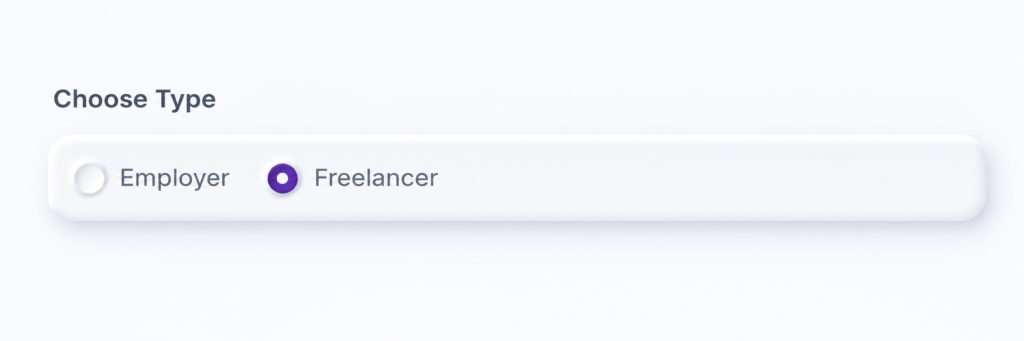
Open the registration page, choose the appropriate Freelancer account option and complete the information requested.


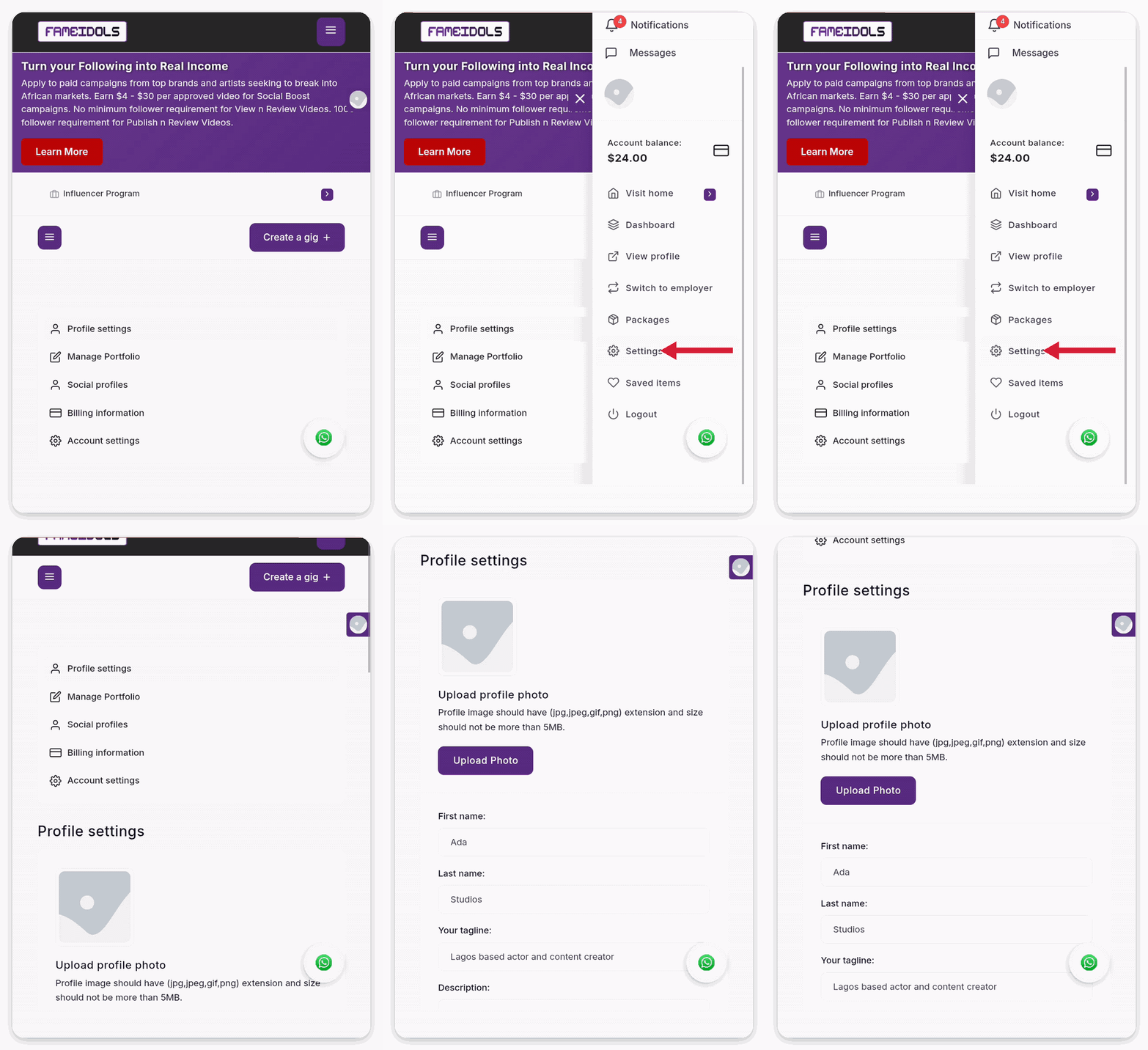
Navigate to Settings Page

Pull out the side tray and tap on Settings. Enter your name, tagline and other details

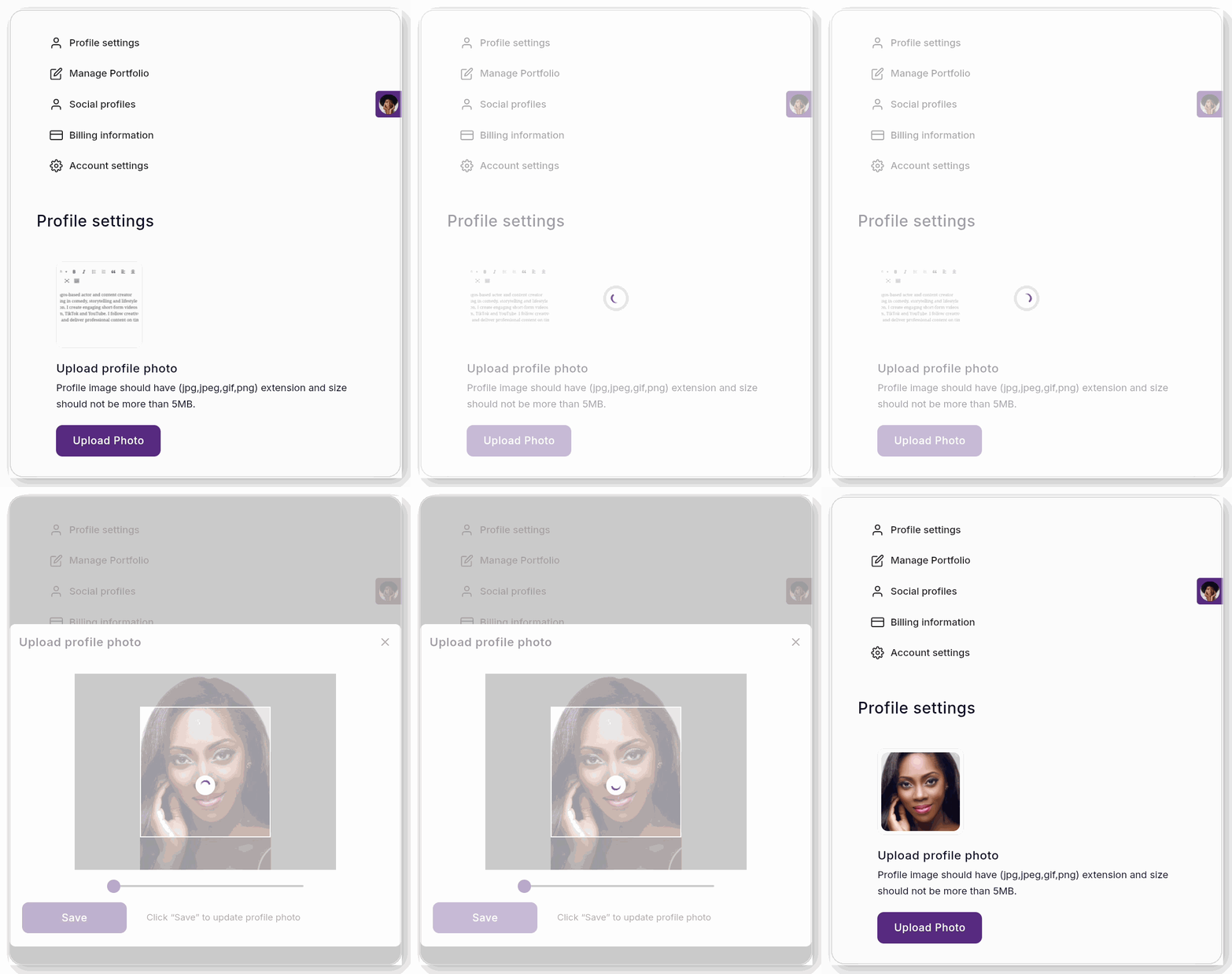
Upload a Professional Profile Photo

Make a great first impression!


Upload a clear, well-lit professional headshot that shows your face and personality. Avoid blurry photos, heavy filters and distracting backgrounds.


Photo Framing Guide: Use a landscape image measuring 700 × 500 pixels, with your head and shoulders clearly visible, your face centred and enough space around your head to prevent cropping.


A professional headshot builds trust, makes your profile stand out and helps brands, musicians and filmmakers feel confident about hiring you for projects.

Create a Tagline and Profile Description That Attracts Clients

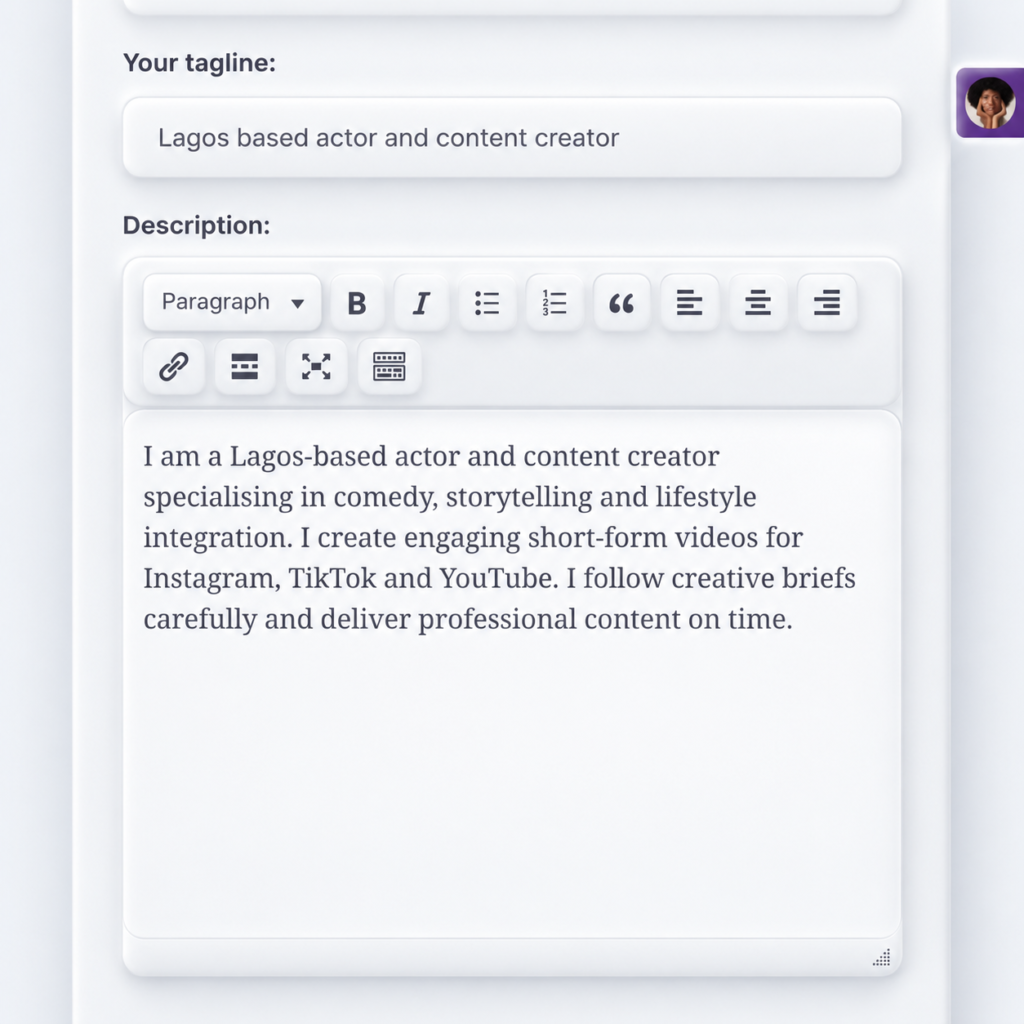
Your Tagline – Tell Clients What You Do

Write a short, catchy sentence that describes your main talent, skills or services. Make it clear what you offer and who you can help.

Use this Formula: [Your Location] + [Your Talent/Skill] + [Your Speciality]


Your Profile Description – Show Clients Why They Should Hire You

Introduce yourself, highlight your skills and experience, and explain the type of content or services you offer. Mention how you can help brands, musicians or filmmakers achieve their goals.

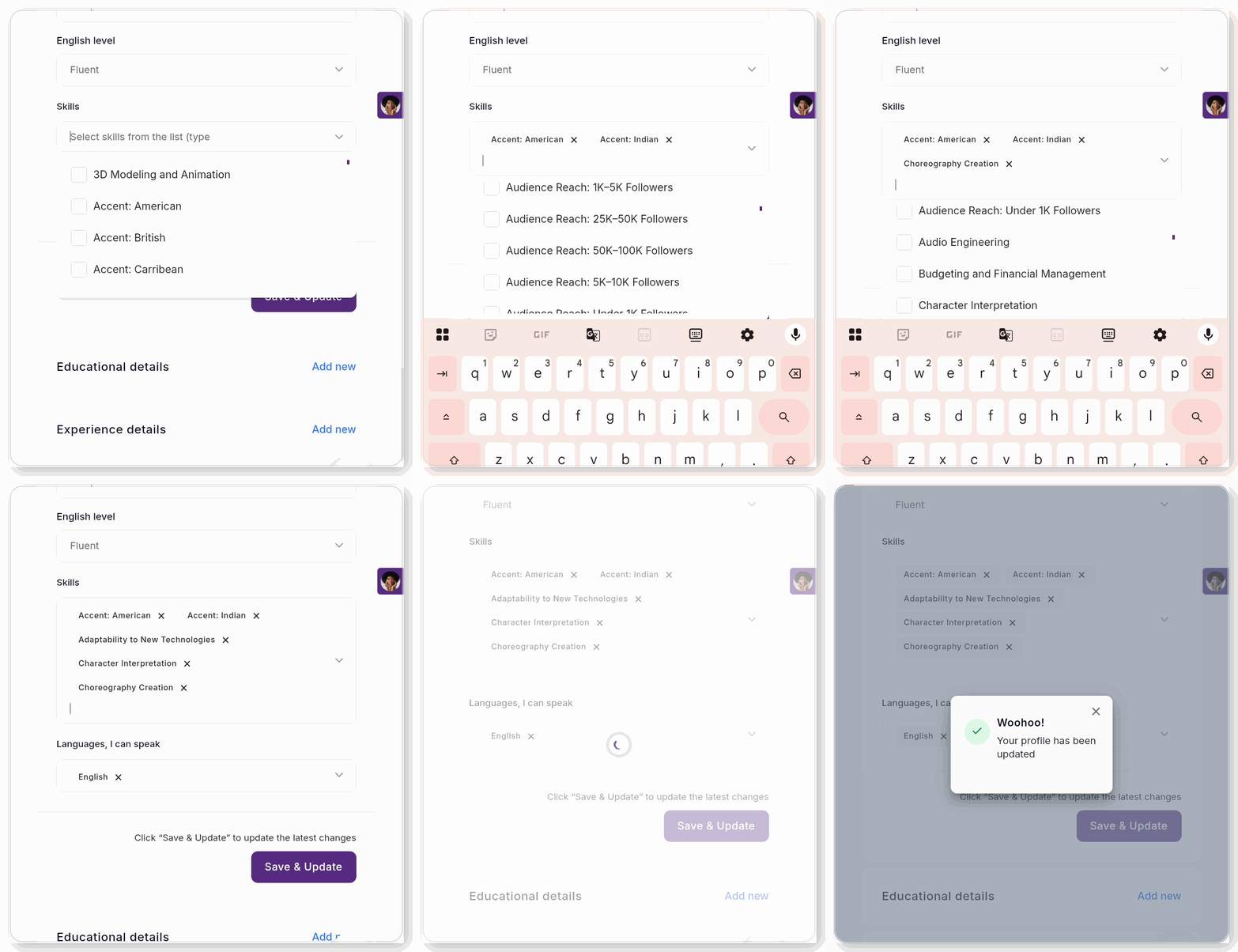
Choose skills that reflect your work

Your skills determine your matches. This is one of the most important parts of this training.


On FameIdols, your selected skills are used to match you with employers immediately after an employer creates a project. For example, if an employer needs someone with Dance Challenge Creation, FameIdols searches for freelancers who have selected that skill.


If you can create dance challenges but have not added the skill to your profile, the system may not match you with that opportunity.Your skills are therefore not just words on your profile. They help determine which Collab Drops projects you are invited to apply for.

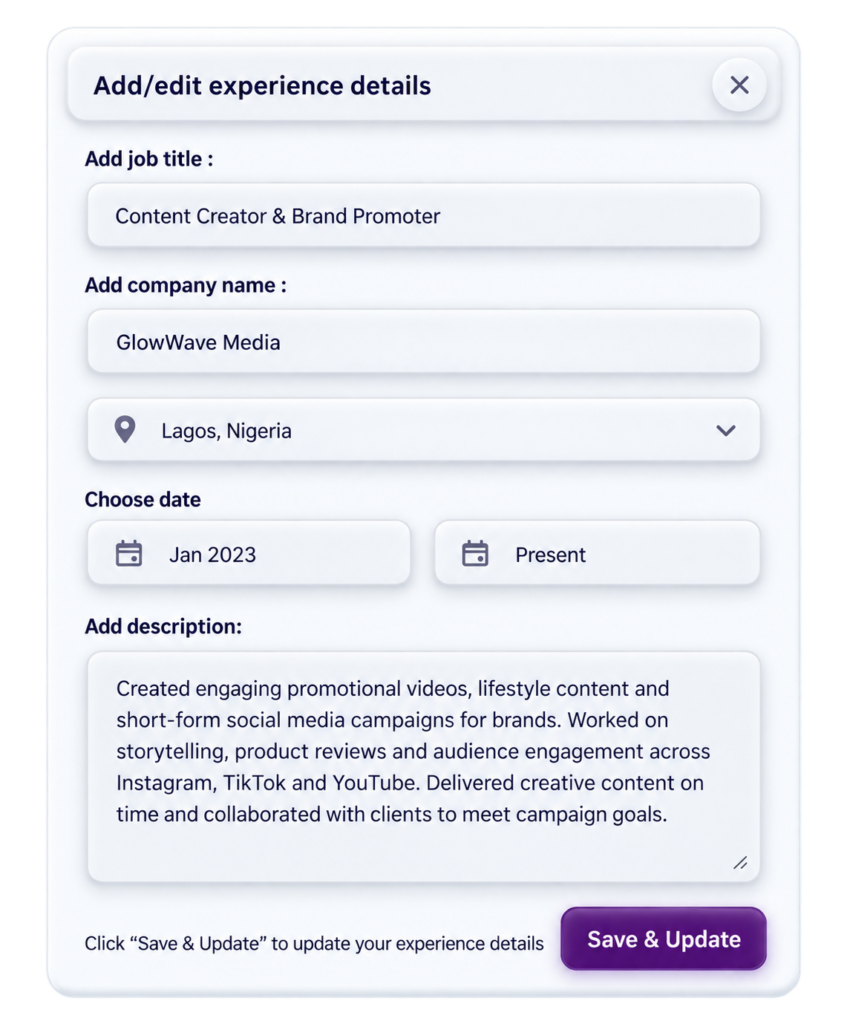
Make your experience visible

Click ‘Add New‘ on the Experience Details menu and fill the form as sampled below. Add samples of previous work to increase employers’ confidence

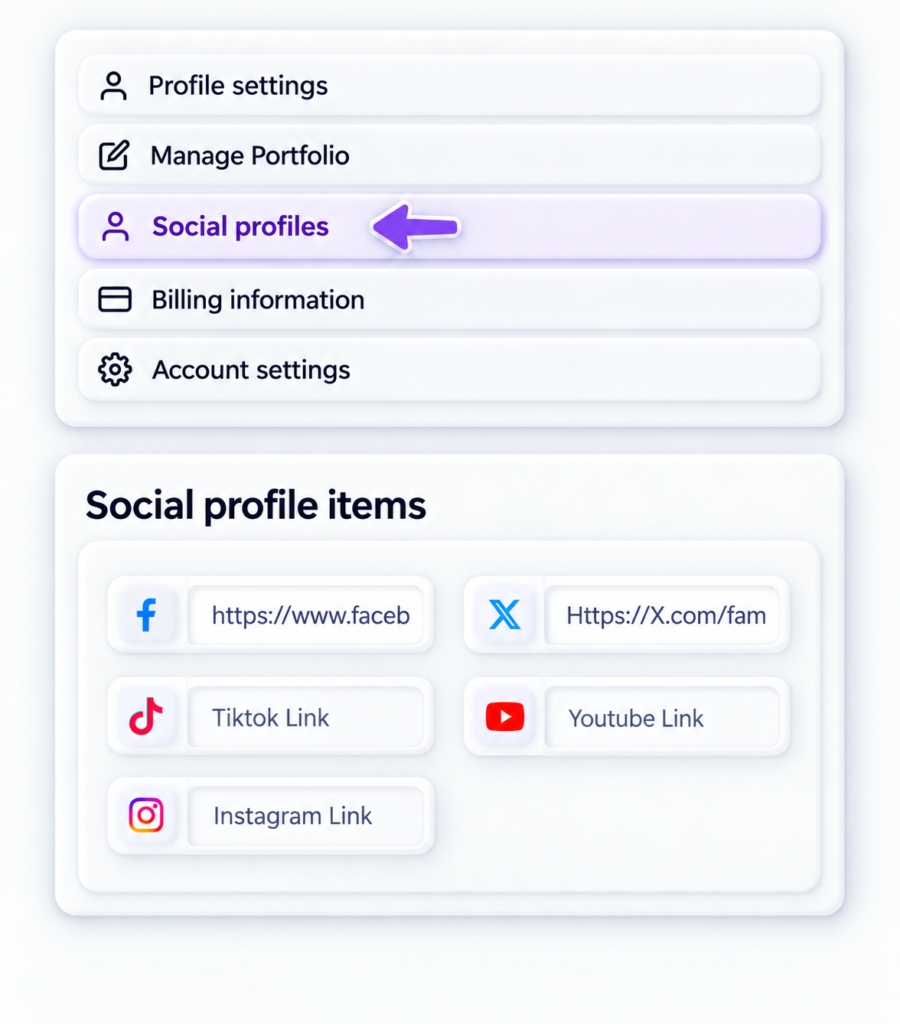
Connect your social profiles

Add links to active social accounts and choose the audience-reach range that honestly reflects your follower count.

Number 2 iconWhite number two inside a purple circle.2
ATTRACT NEW EMPLOYERS

Create a Gig to Showcase Your Service

A gig explains the specific service an employer can hire you to provide. It is a key part of becoming ready for Collab Drops projects.

Important Info

This part of the training guides you on how to create a gig as a freelancer. It is important to ensure you have registered as a FREELANCER on the FameIdols Registration Page.


Next, you should first make a creative gig video as described in step.1 before you proceed to step.2 

YOUR CREATIVE GIG VIDEO CREATION

Your Mission: Create A Video Content That Makes Someone Want to Hire You!

Employers will assess your gig based on your talent, creativity, presentation and ability to produce content that a potential employer would find valuable. Use any of the creative briefs below to create a sample video you will add to your gig. 


Freelancers are welcome to choose any suitable product, song, movie or creative project and demonstrate how their talent could help promote it.


Once you have created the video, upload it to your YouTube, copy the share link and add it to your gig in Step 6


Choose ONE of the following creative challenges.


CREATIVE BRIEF 1: BRAND & PRODUCT PROMOTION

Project: New Product Launch


The Scenario

Imagine a new company is launching a new product which could be any kind of item.

The company wants creative content that will attract attention, entertain potential customers and encourage people to try the product.


Your Challenge

Choose a product such as a smartphone, clothing item, food product, beauty product or household item.

Create an engaging advertisement, comedy skit, product demonstration, lifestyle video or other creative promotional content


You can approach this challenge in any creative way.


Examples of what you could create:

A funny comedy skit featuring the product.

  • A creative product advertisement.
  • A lifestyle video showing people enjoying the product.
  • A short dramatic story built around the product.
  • A dance or transition video featuring the product.
  • An entertaining product review or demonstration.
  • A cinematic commercial.
  • A creative animation or edited promotional video.

What the Employers want to see:

Can you use your talent to make an ordinary product interesting enough to attract potential customers?


Note:  You may use a suitable unbranded product, a handmade mock-up or a digital product design to demonstrate your idea.


CREATIVE BRIEF 2: MUSIC PROMOTION

Project: An Afrobeats Music Release


The Scenario

Imagine an upcoming Afrobeats musician has released a new song 

The musician wants creative content that will generate excitement, attract listeners and encourage people to engage with the song on social media.


Your Challenge

Create an original video demonstrating how your talent could help promote the music.


Examples of what you could create:

  • A unique dance challenge.
  • A comedy skit inspired by the song.
  • A creative music reaction video.
  • A short story incorporating the music.
  • A cinematic music promotion video.
  • A choreography performance.
  • A creative transition video.
  • A fashion or lifestyle video inspired by the music.
  • An entertaining social-media challenge.


What the employers want to see:

Can you create content that makes people interested in discovering, listening to or sharing a new song?


Note: You may use original music, appropriately licensed audio or music you have permission to use. Better still, use an AI generated music to avoid copyright issues.


CREATIVE BRIEF 3: MOVIE & VIDEO PROMOTION

Project: A Romantic Comedy

The Scenario

Imagine a filmmaker is preparing to release a new movie. The movie tells an entertaining story about love, relationships and unexpected situations in your country.

The filmmaker wants creative content that will generate excitement and encourage people to watch the movie.


Your Challenge

Choose a movie and create an original promotional skit, reaction video, teaser concept, character performance or other engaging content.. Create an original promotional video that makes potential viewers interested in the movie.


Examples of what you could create:

  • A funny romantic comedy skit.
  • A dramatic scene inspired by the movie.
  • A short movie teaser.
  • A creative character impersonation.
  • A humorous relationship scenario.
  • A cinematic promotional video.
  • A storytelling video.
  • A reaction-style promotional concept.
  • A creative video edit or animation.

What the employers want to see:

Can you use your talent to create anticipation and excitement around a movie release?


Important Guidelines

  • Your content must be original and demonstrate your own creative contribution.
  • You do not need to be officially employed by the brand, musician or filmmaker.
  • Do not falsely claim to represent or have an endorsement from a brand or artist.
  • Clearly identify any unofficial or fictional promotional concept.
  • Use only music, video clips, images and other materials you own, have permission to use or are otherwise legally entitled to use.
  • Your content must comply with FameIdols platform policies.

Remember: The employers and judges are not evaluating how famous the product, song or movie is. They are evaluating what YOU can creatively do with it.


 VIDEO SUBMISSION REQUIREMENTS

Every freelancer must upload a creative demonstration video to their FameIdols gig.


Video Duration

Minimum: 30 seconds

Maximum: 5 minutes

Videos longer than five minutes will not be approved.


What Should Your Video Contain?

Your video should demonstrate your ability to create content that a potential employer would want to pay for.

You may briefly introduce yourself and your service, but the main focus must be on demonstrating your talent.

Three Questions to Guide Your Video

Before recording, ask yourself:


QUESTION 1: WHAT AM I SELLING?

What creative service can I offer to a brand, musician or filmmaker?


QUESTION 2: WHAT CAN I CREATE?

How can I use my talent to produce original, engaging or entertaining content that helps promote a product, song or movie?


QUESTION 3: WHY SHOULD SOMEONE HIRE ME?

What can I demonstrate in this video that would convince a potential employer to pay for my creative service?

You do not need to answer these questions verbally.

Your creative performance should demonstrate the answers!


Suggested Video Structure

Part 1: Introduction

Briefly introduce your creative service.


Part 2: Creative Demonstration

Showcase your talent by creating promotional content for your chosen product, song or movie.


Part 3: Closing Pitch

Briefly explain what kind of creative content you can produce for potential clients.

The introduction and closing pitch are optional. The creative demonstration is compulsory.


Important:

A video containing only a personal introduction or a verbal description of your abilities will not qualify.

SHOW YOUR TALENT. DON’T JUST TALK ABOUT IT!
CREATE A GIG

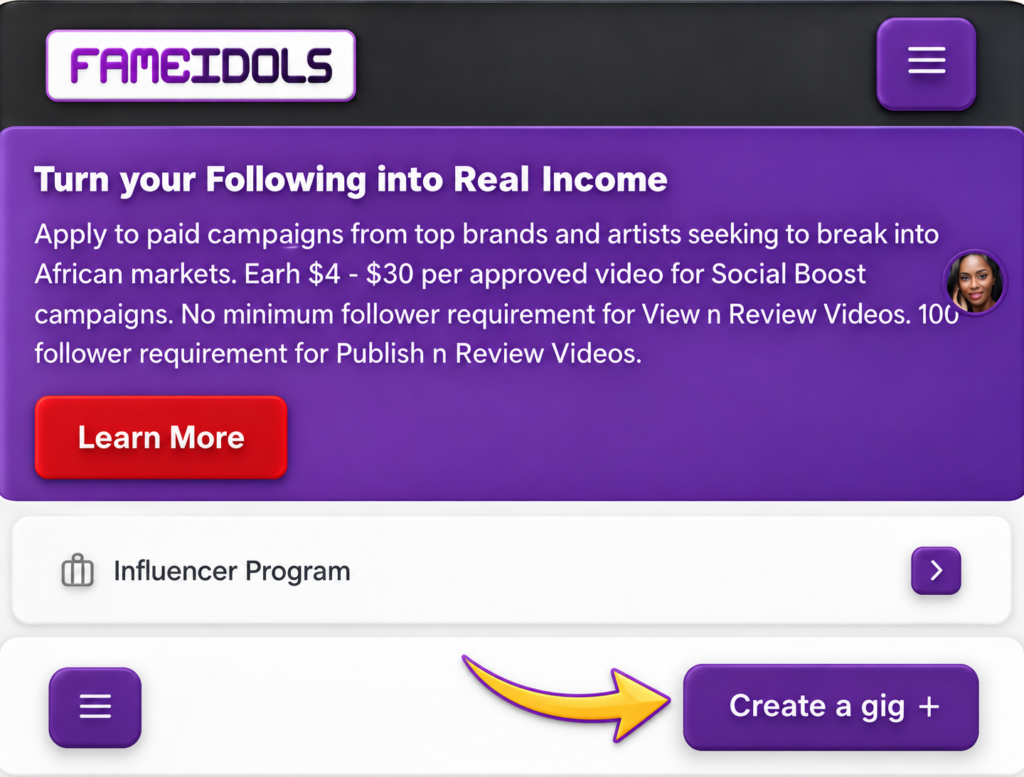
Log into your FameIdols Account . 

On your dashboard, click on CREATE A GIG as shown on the image below

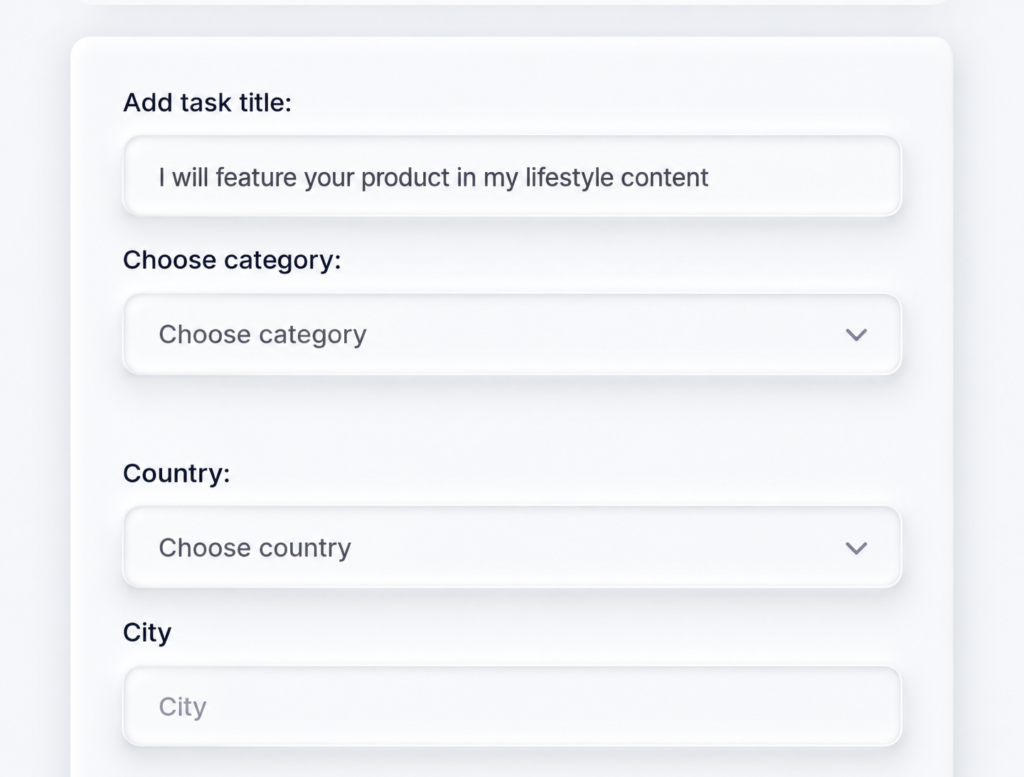
WRITE A CATCHY TITLE

An effective title will determine the click-through-rate on your gig. The more employers click through your gig, the higher your chances of being hired. This largely depends on how catchy your title is. 


Do not write titles like, ‘ I will advertise your brand’. Good gig titles should look like the examples below:

– “I will create an engaging dance challenge for your song”

– “I will produce a funny promotional skit for your brand”

– “I will create a professional music reaction video”

– “I will feature your product in my lifestyle content”

– “I will film and edit a cinematic promotional video”


Category : Select a category that matches your content creation category. 

For example, if your content type is drama based, select Acting , if it is song based, select Singing …e.t.c


Country: Select the country where you are based and work in. You will also be asked to select the state or region in the country you are based in.

City : Add the city where you are based in that state or region chosen above. This will help employers looking for creators based in a particular city.

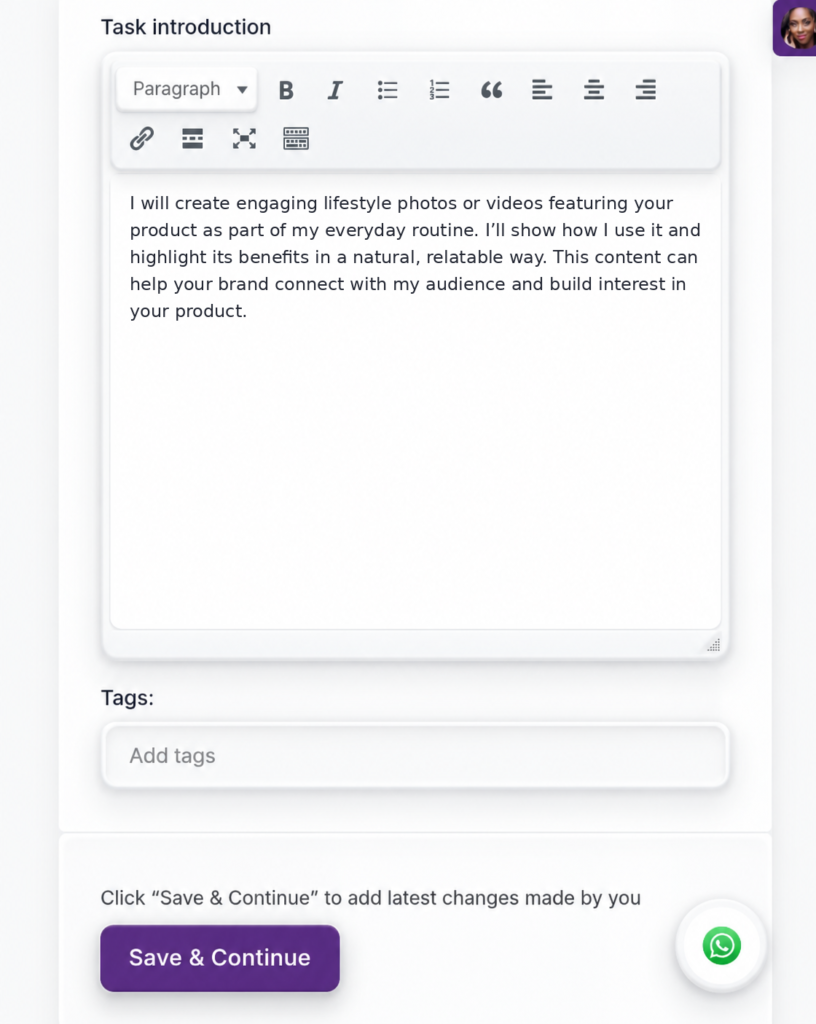
Task Introduction

Your task introduction should include:

  • A detailed service description
  • What the employer will receive
  • Relevant skills
  • Realistic delivery expectations

Your gig, profile and selected skills should match. 

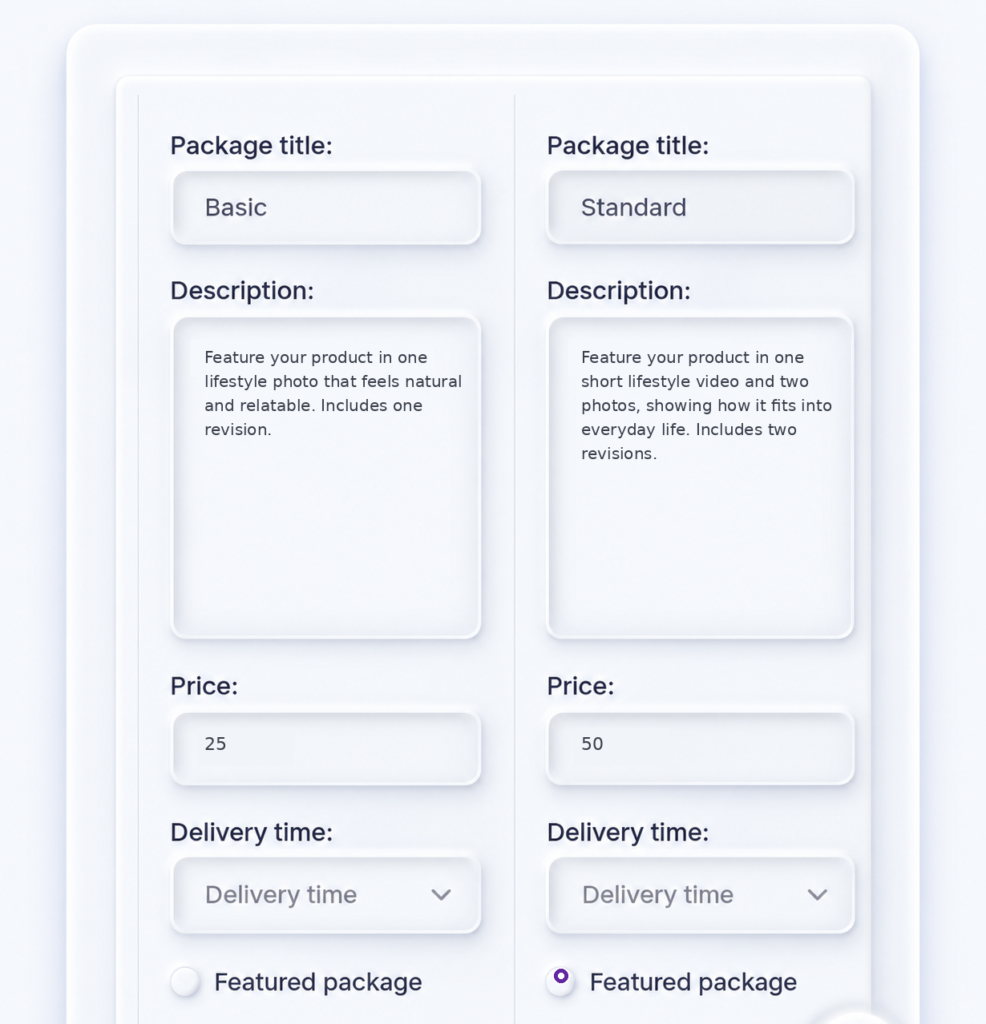
Pricing

Packages: Your gig can offer up to 3 packages – Basic, Standard and Premium. However, you do not have to create up to 3 packages. You can choose to create only one package for your gig. 


Description: Use this section to tell the employers what they will get for each package ( see image below for samples). Each description should answer the question, ‘Why is this package unique?’


Price: Pricing is generally in USD ($). Do not bother to enter the $ sign. Simply enter the figure as shown in the sample image below. 


Delivery Time: How long will it take you to deliver this project?  1 Hour? 1 day? 2 Days? 1 Week? e.t.c.


Featured: This is only important if you have a premium plan in your account. This tells the system which of your packages should be featured on our search pages. Featured packages get 10x more visits on search pages. 

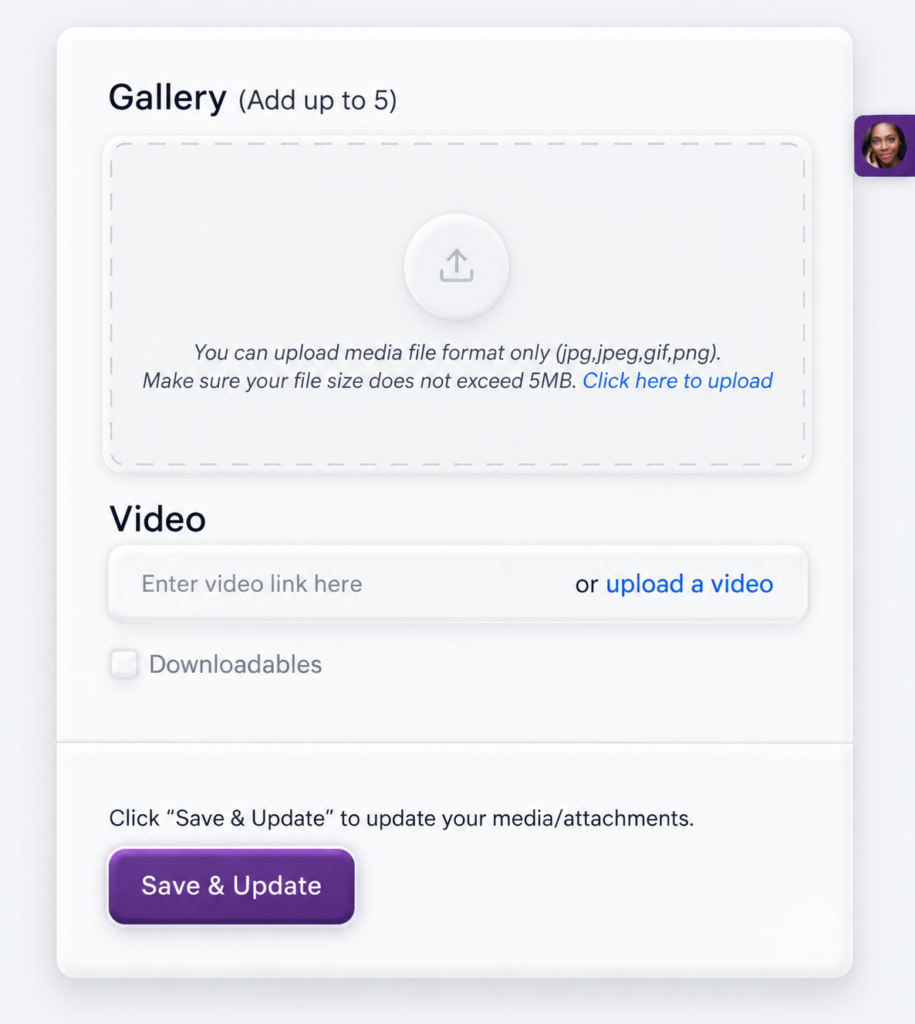
Gallery

Gallery: Tap on the upload icon to add one or more work photos. These should showcase some jobs you have done in the past. 

Video: This is where you will add the creative gig video you created in step.1 

Ensure that you have uploaded the video to Youtube and share the link here. If the video is less than 3 minutes, upload directly to Fameidols using the upload link. 

Next, Click on ‘Save & Update‘

Important to note that gigs created without a photo, will not be approved. 

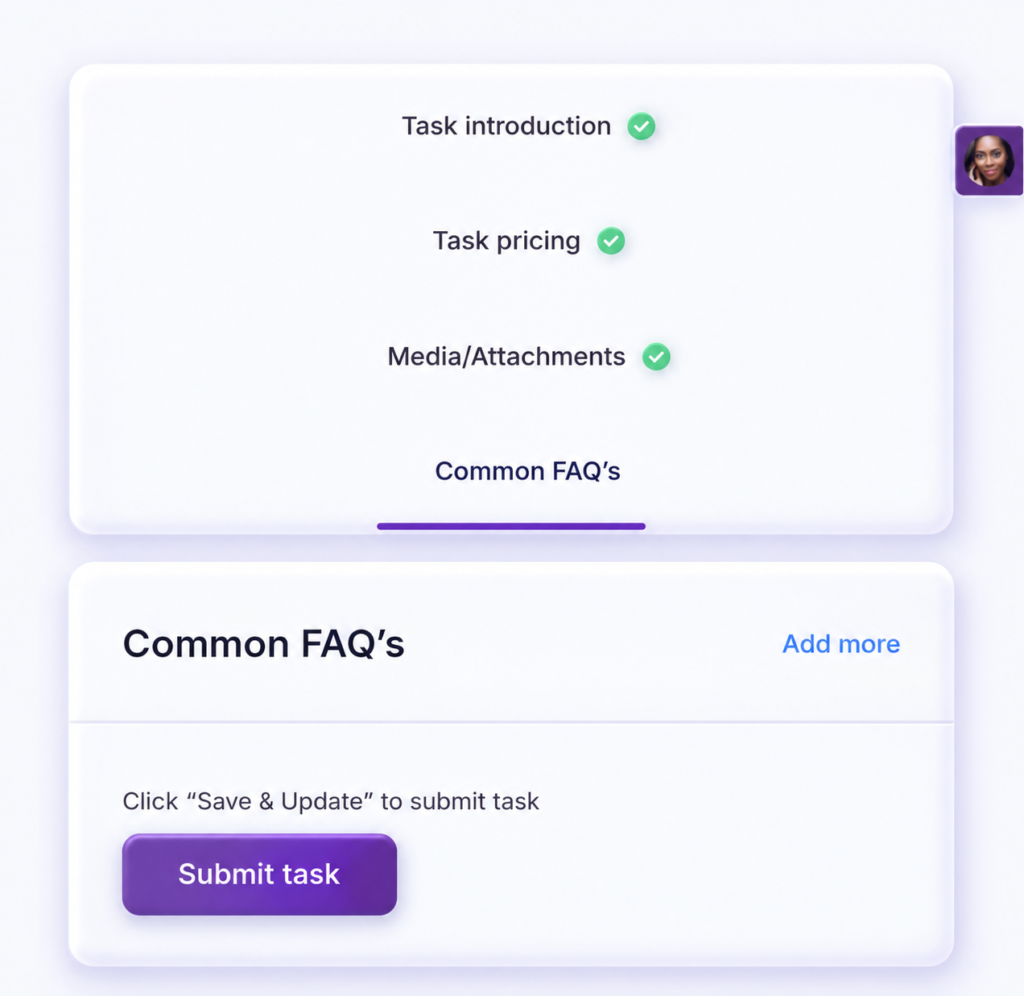
Enter FAQs

Use this form to enter answers to frequently asked questions about your services.

Once you have finished this, click on ‘ Submit Task‘. 


In 24-48 hours, an admin will go through your gig and approve if it meets our guidelines. 

Number 3 iconWhite number three inside a purple circle.3
APPLY TO COLLAB DROPS PROJECTS

Send Proposals to Employers

FameIdols matches project criteria with suitable creator profiles, but a match is not an automatic hire. You still need to make a convincing application. Choose a step to explore below..

💡 Helpful tip

 Use your gig and portfolio as evidence. Keep communication, deliverables and payment arrangements clear.
 

Explore suitable Collab Drops Projects

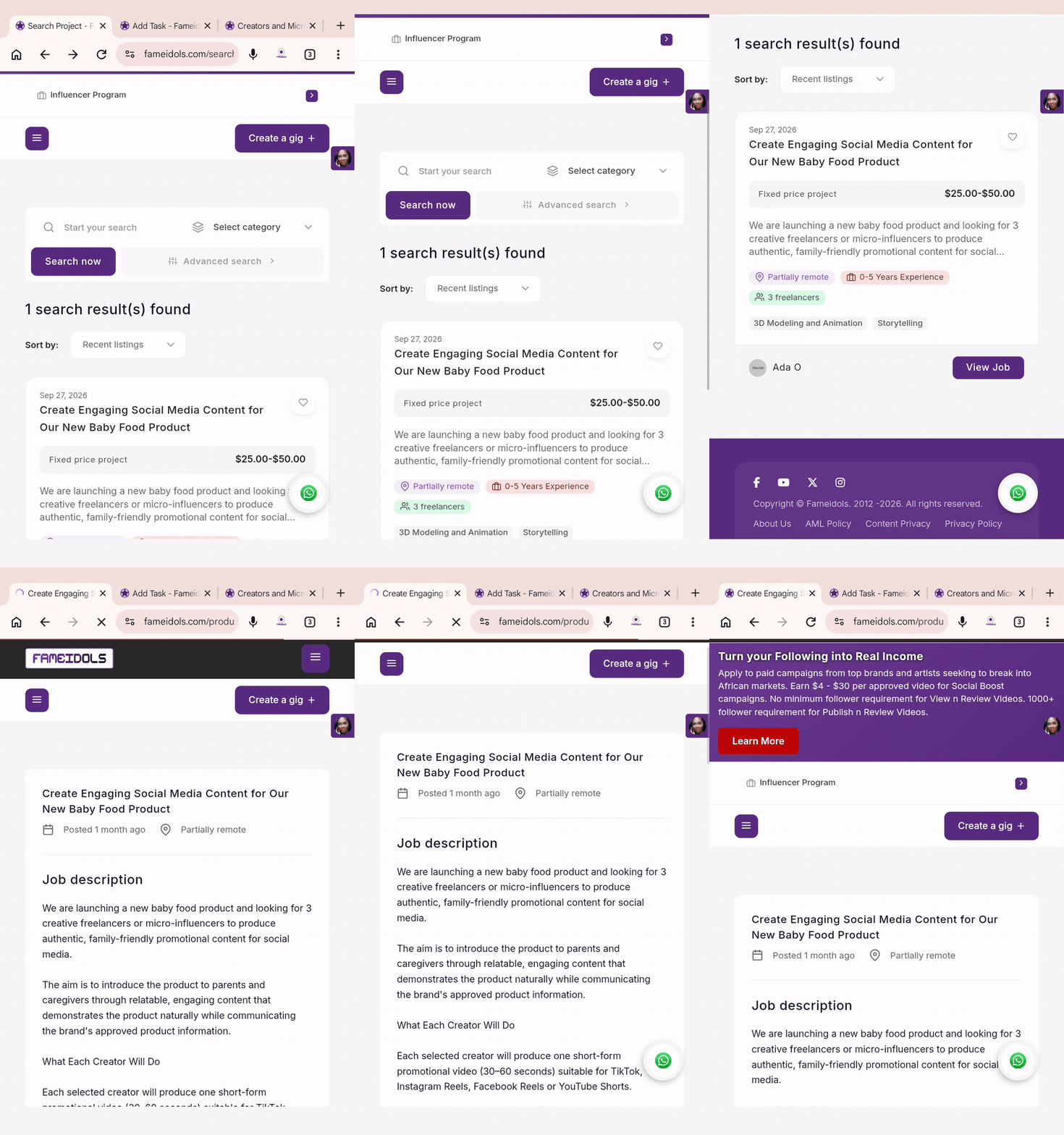
Login to your account and you will be redirected to the project opportunities or matching projects area. Look for briefs that suit your skills, language, content style and availability, then click on VIEW JOB

Read the full brief

Check the expectations first. Read the objective, deliverables, required skills, deadline, budget and any application instructions before applying.


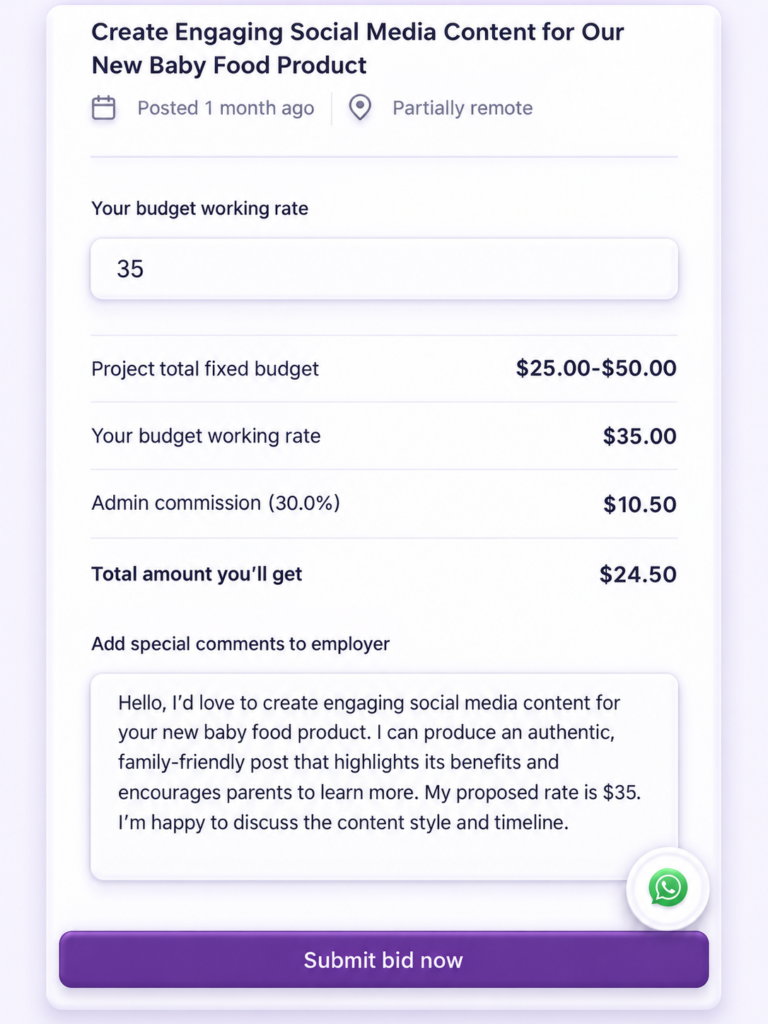
Write a Tailored Proposal

Explain why you’re a good fit. Make a strong pitch.

Introduce yourself briefly, refer to the specific project, describe your approach, mention relevant examples and propose a realistic price or timeframe where requested.


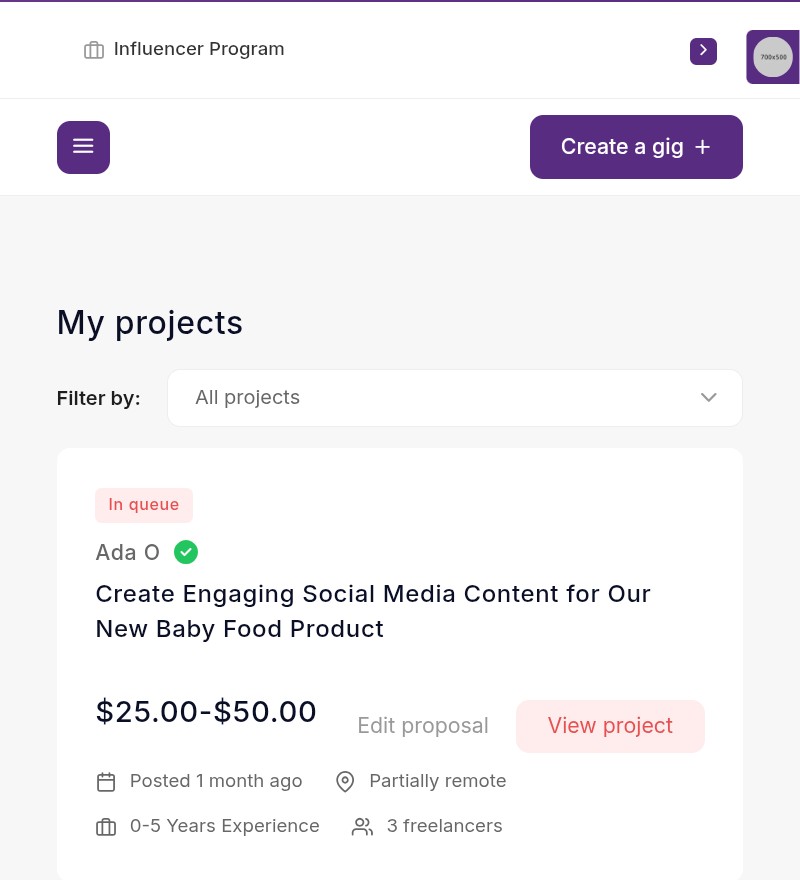
Submit and Follow up

Watch for employer replies.

Submit your proposal and monitor project messages or notifications. Respond promptly, agree on terms and start work only once hired.

 
Number 4 iconWhite number four inside a purple circle.4
SOCIAL BOOST OPPORTUNITIES

Earn As A Micro-Influencer

Micro-influencers can explore eligible Social Boost campaigns, including approved creator posts and content-based tasks, depending on campaign and platform rules.

Join the Influencer Program

  • Log into your freelancer account 
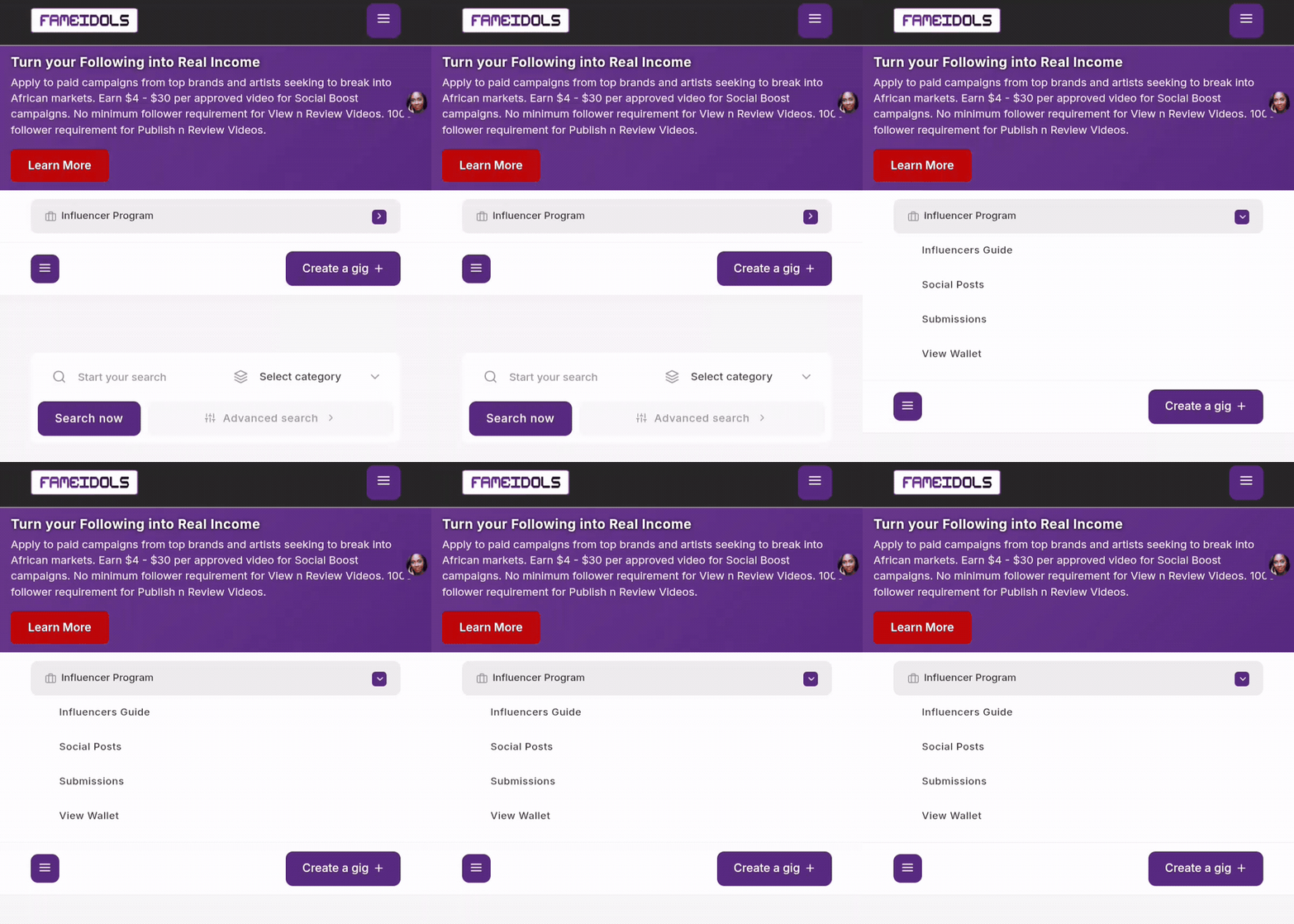
  • Tap on the Influencer Program drop down menu as shown in the image below 
  • Click on Social Posts 

Go To Social Posts

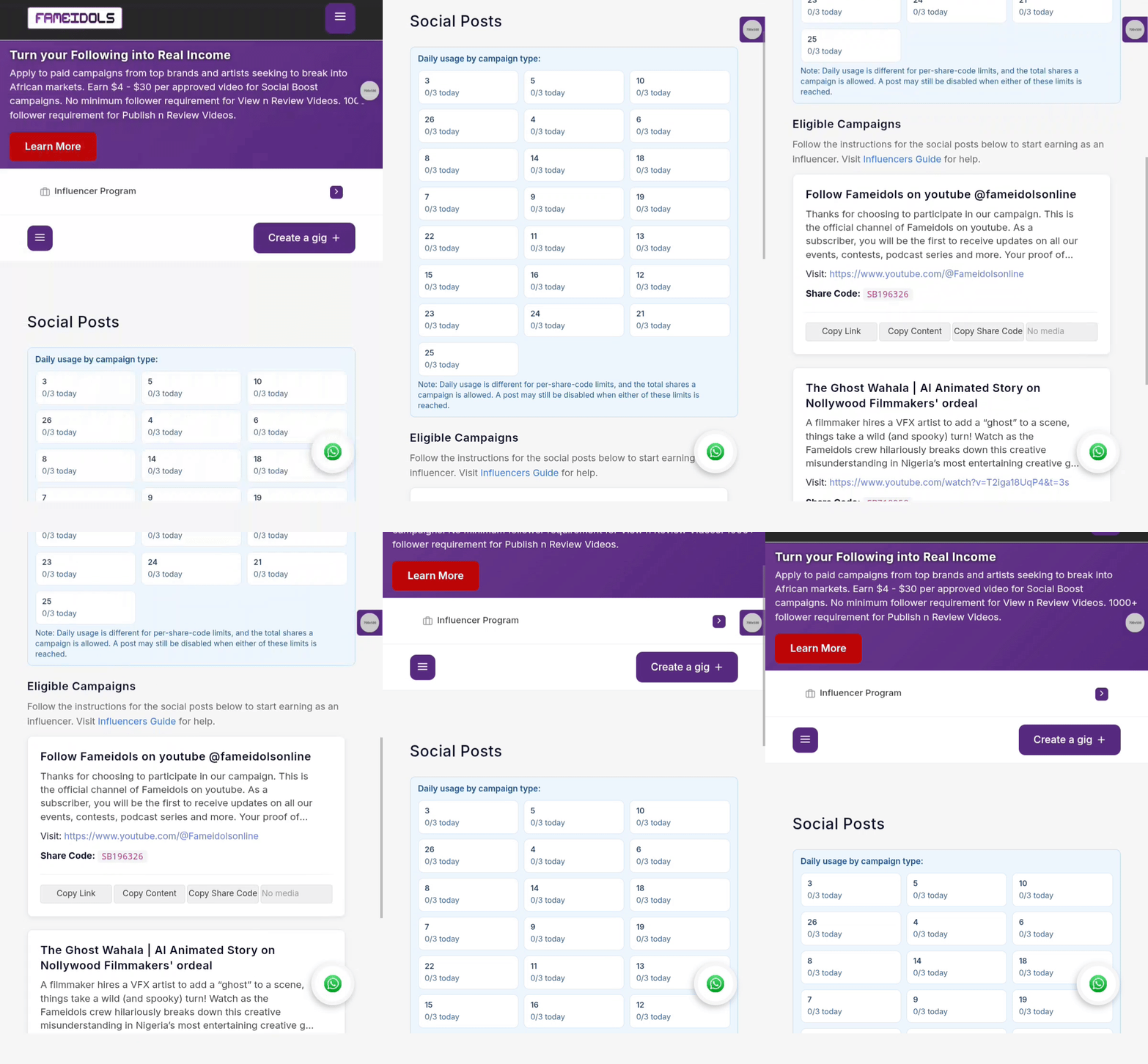
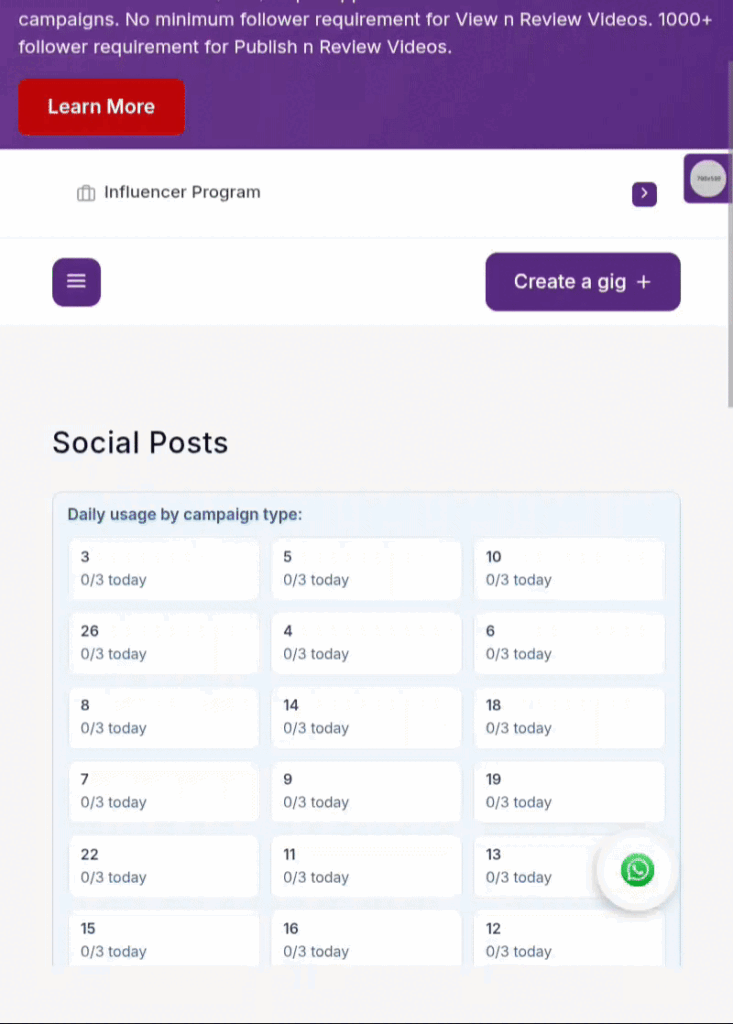
When you click on social posts from Step.1, you will be taken to this page in the media below. 


In the blue section, you will find the various campaign types you can participate in per day. The number of campaign types you can participate in per day depends on your membership type. See the FAQ section below for details on membership plans.


In eligible campaigns section, here you will find the available campaigns and campaign instructions and materials you can download and use on your social media page or the client’s page.


Therein you will find 2 types of campaign tasks:


Publish UGC : This type of task requires you to use the available text and media provided by the client to publish a post on your social media profile. This is called a User Generated Content (UGC)


Watch & Review: This type of task requires you to visit a client’s content on their social media profile and share a genuine review or opinion between 10 – 100 words.  

Go To Submissions Page

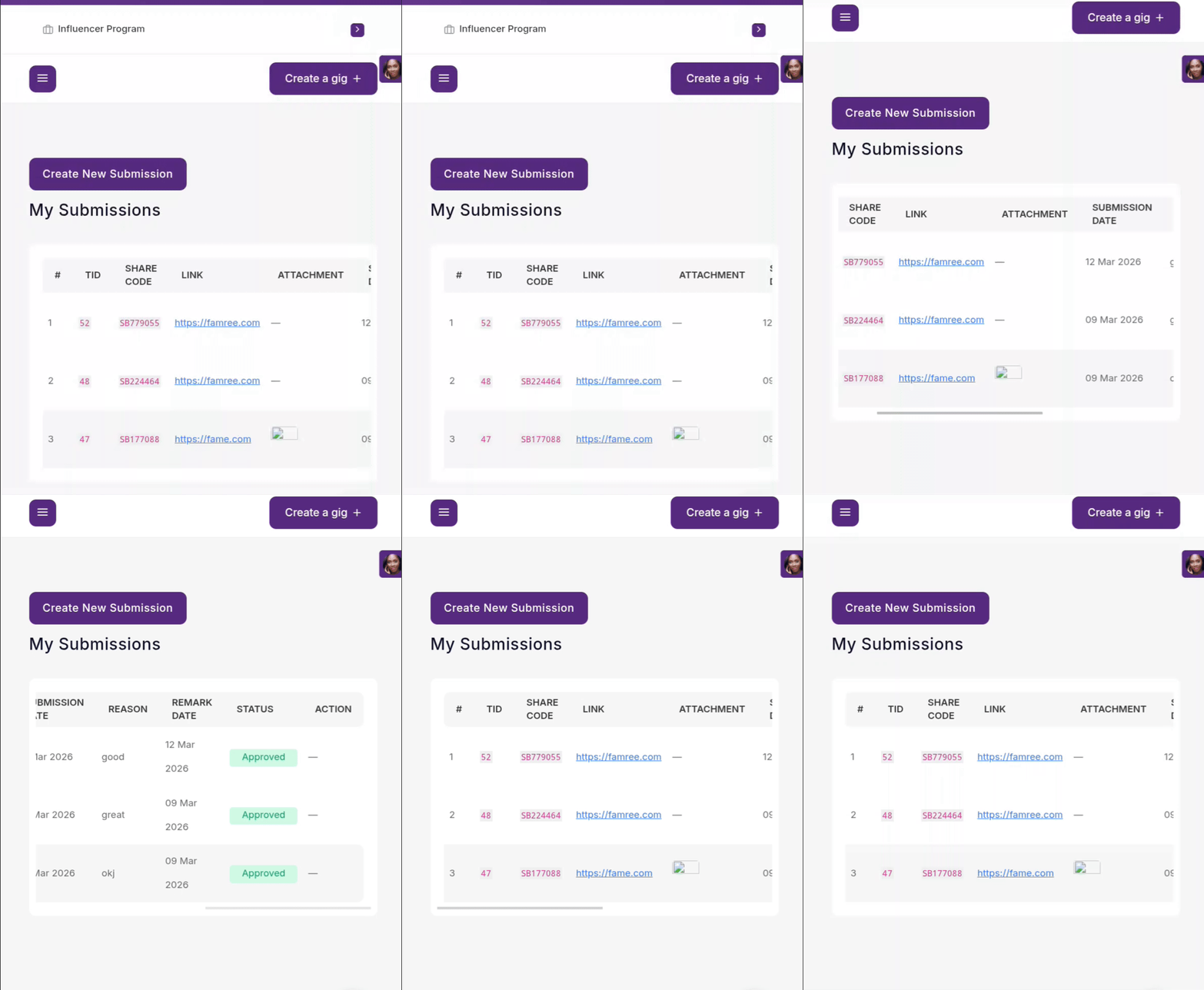
  • Click on Influencer Program drop down menu
  • Tap on Submissions menu
  • Click on Create New Submissions
  • Share Code: This can be found on the campaign you chose to promote from Step.2
  • Submission Link: Add a link to the post you have made using the clients media and instructions
  • Upload Media: Make a screenshot or screen recording of the post you have made for the clients to further prove your creative delivery.
  • Click on Save submission for admin’s approval.

Review the status of your activity

Click on Submissions and check the review status and any approved earnings in your dashboard.

Pricing Features comparison

How much does a Collab Drops activation cost ?

This is the FameIdols pricing model for creative activation, subject to the plan you purchase and the final campaign terms. 

Each package gives you access to Collab Drops and Social boost  features as allocated in the table below.

 
FeaturesBasicBronzeSilverGoldDiamondPlatinum
SOCIALBOOSTFEATURES
Social Boost Creatives15 or less20 or less26 or less150 or less300 or less150 or less
Publish UGC Audience Size1000+2500+5000+10001000+2500+
No of Campaigns112333
Shares/ Engagements per Campaign1520135010050
Watch & Review Campaign TypeYesNoNoyesYesNo
COLLABDROPSFEATURES
No of Collab Drops Projects246101520
Featured Collab Drops Projects046101520
Collab Drops Project Duration30 Days30 Days30 Days90 Days90 Days90 Days
Price126 USD360 USD1000 USD1260 USD2520 USD2700 USD

Freelancers FAQ FAQ's

  • Is joining FameIdols free, and do I need a paid membership to get work?

    You can create a freelancer account for free. Your membership determines the features and opportunities available to you. Check the freelancer membership page to see what is included in the free and paid plans.

  • FameIdols welcomes freelancers from all African countries. Available withdrawal methods depend on your location. Before accepting work, check that your account supports a payment method you can use.

  • You must be 18 years or older and meet any parental-consent requirements to register and accept paid work.

  • Yes. You can use original sample projects to demonstrate your skills. Your creative gig video should show what you can deliver, even if you have not worked with paying clients before.

  • Yes. Some Collab Drops projects focus on your creative skills and the quality of your content. Projects requiring you to publish to your own audience may have minimum follower requirements. Always check the brief.

  • You may need to verify your identity before [applying for projects / receiving payments / withdrawing earnings]. If verification is required, your dashboard will explain what to submit.

  • Each plan provides specific access to platform features and eligible opportunities. Compare the plans for details about campaign limits, gig allowances, visibility and membership duration. Choose a plan that matches your availability and services.

  • Your daily allowance depends on your membership and the campaign type. Check the ‘Daily usage by campaign type’  section on your Social Posts page. Your allowance does not guarantee that enough eligible campaigns will be available each day.

  • Daily limits reset at the end of your plan. Unused allowances do not carry forward 

  • No. Membership provides access to the features included in your plan. Employers select freelancers for projects, and Social Boost earnings depend on campaign availability, eligibility and approved submissions.

YOU’RE READY TO BEGIN

Make your next opportunity happen!

Build a profile employers trust, publish a service you can deliver and apply confidently. If you're eligible for Social Boost, explore campaigns that match your audience and skills.